
School management software, made for Pakistan
Your whole school, run simply. Every parent in the loop.
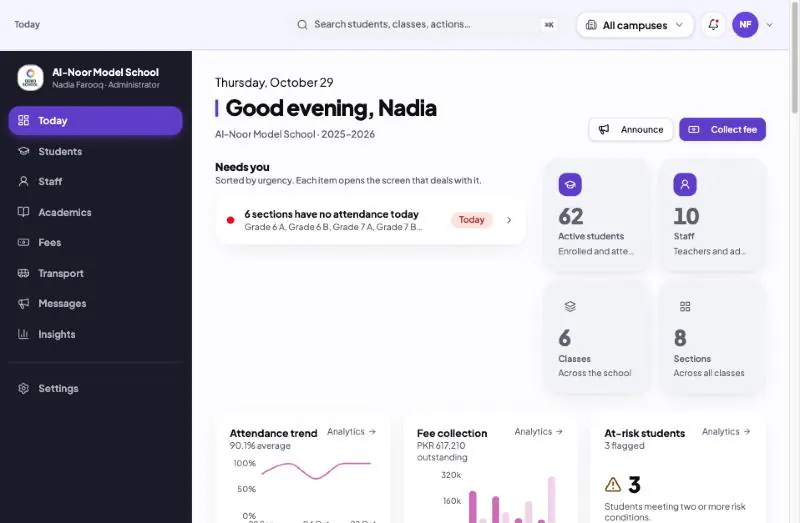
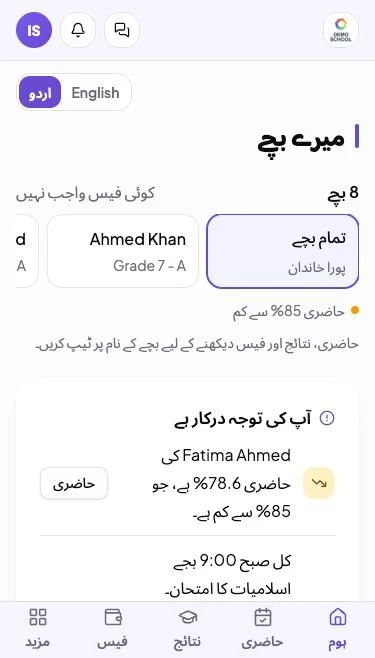
EduBind runs admissions, fee vouchers, attendance, exams, payroll and reports in one place — and gives every parent an app in Urdu or English that opens with just their mobile number. No email needed.
- Fee vouchers in PKR
- WhatsApp & SMS alerts
- اردو + English
- Parents need no email
- ready-to-print reports
- 20+
- ways to reach parents: app alert, WhatsApp, SMS, email
- 4
- languages for parents: Urdu and English
- 2
- system for every campus you run
- 1
Swap the registers, the Excel sheets and the 9 pm WhatsApp group for one system
Today
With EduBind
Fee challans typed one by one, payments checked against a notebook
Every family's voucher generated in one click, bank payments matched automatically
Result cards assembled by hand at the end of every term
Marks entered once; result cards, positions and the result sheet worked out for you
Parents call the office to ask what the fee is, or why their child was marked absent
Parents see attendance, fees and results on their phone, and get an alert when it matters
Nobody knows which families are overdue until the year is over
The defaulters list names them this morning, with the amount and how long
Everything a school runs on
From the first enquiry to the last result card
Each part works on the same student record, so nothing is typed twice. Pick one to see the real screen.
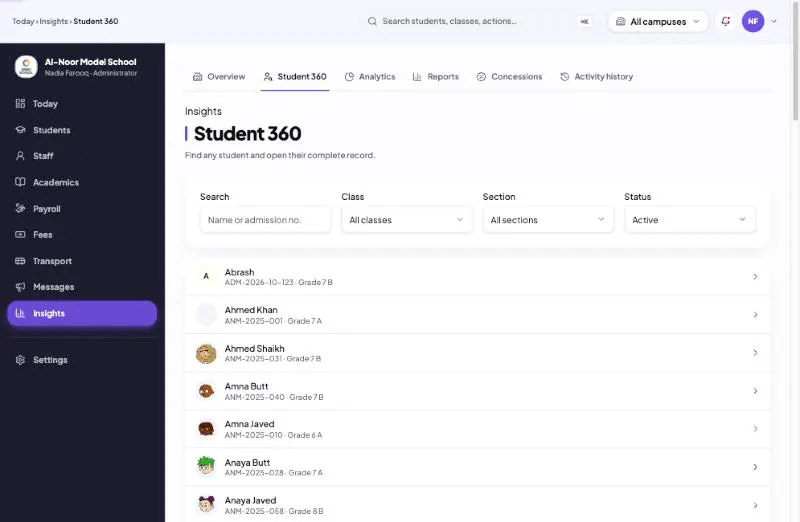
Admissions and the student 360 profile
Track every family from the first phone call to the first day of school.
- Admission pipeline: enquiry, applied, offered, admitted — with every step dated
- Admitting a child creates the student record, places them in a section and raises the registration fee
- Student 360: attendance, grades, fees, leave, transport and gate scans on one page
- ID cards, and leaving, character and merit certificates with serial numbers
- Bring your existing students and parents in from an Excel sheet
Fees and accounts
Every rupee billed, received and traced
The part of the school that pays for everything else. EduBind bills each month, prints the challan, follows up and matches the bank — so the accounts office stops chasing paper.
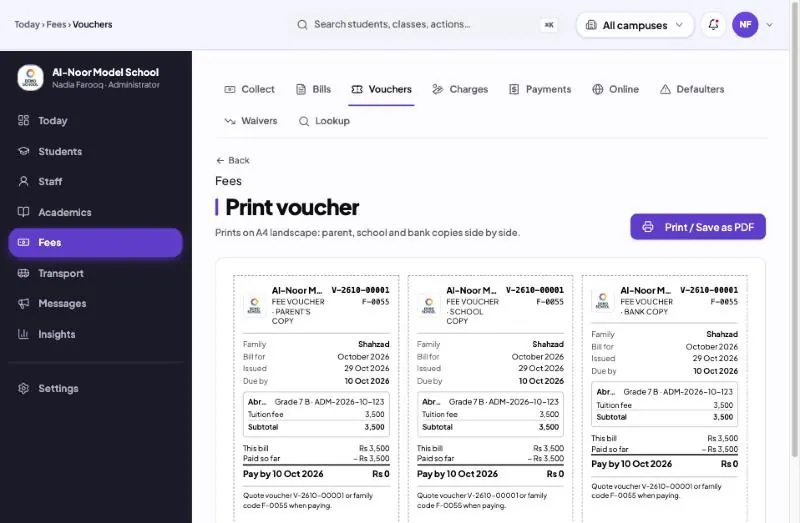
Monthly bills and fee vouchers
Generate the whole school's bills in one go. Vouchers print with parent, school and bank copies on one A4 sheet.
Family billing
Brothers and sisters on one voucher with one family code, and a sibling discount if you give one.
Concessions and late fees
Concessions with a reason — merit, staff child, hardship — and a late fee added to the next bill automatically.
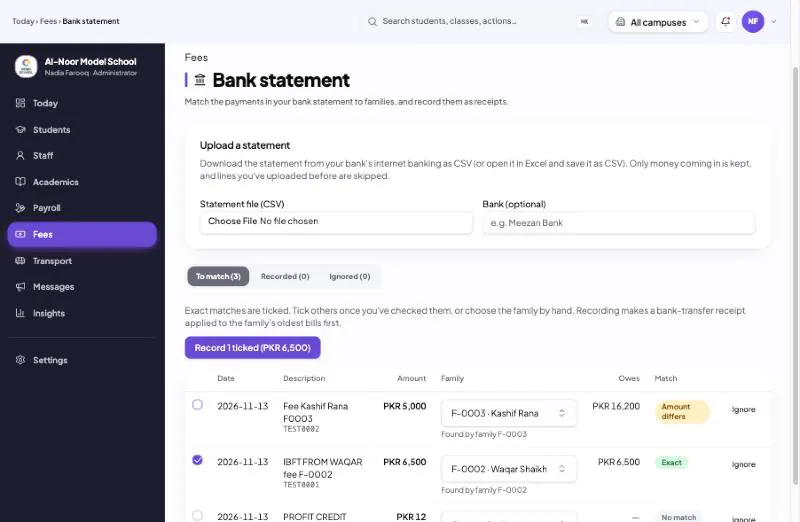
Bank statement matching
Upload your bank statement and EduBind matches each transfer to the family that paid, then issues the receipt.
Parents can also pay online from the app with JazzCash, Easypaisa or a card.
The parent app
An app every parent can use — in Urdu
Most parents in Pakistan have a phone number, not an email address. EduBind is built for them: they sign in with their mobile number and read everything in the language they prefer.
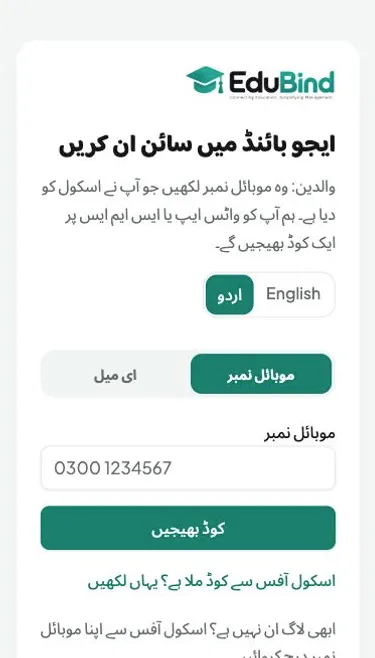
Sign in with a mobile number
The parent types the number they gave the school and gets a code on WhatsApp or SMS. No email, no password to forget.
Urdu or English
Every screen and every message in either language, switched with one tap.
Installs from the browser
Added to the home screen like any app — nothing to download from the Play Store.
Alerts that arrive
Absence, arrival at the gate, homework, fee bills, receipts and results — as a phone alert, WhatsApp, SMS or email, and kept in the app's notification bell.
Children at different schools
One number works at every EduBind school; a parent with children at two schools simply chooses the school.
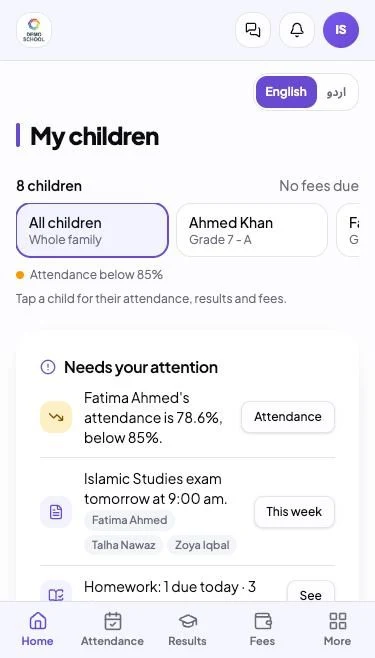
Fees, results, attendance and meetings
What is due and what was paid, each term's results, every day's attendance and parent-teacher meeting times, child by child.
Parent messages
Parents talk to the school — not in a WhatsApp group
A parent can message the class teacher or the school office from the app. Conversations stay inside the school, on record, and no teacher has to share a personal number.
- Message the class teacher about a child, or the school office about fees and admin
- The principal, vice principal and accounts office answer the office inbox together
- The principal can read class-teacher conversations, and parents are told so
- A new reply rings the parent's notification bell
Campuses
Run every campus from one place
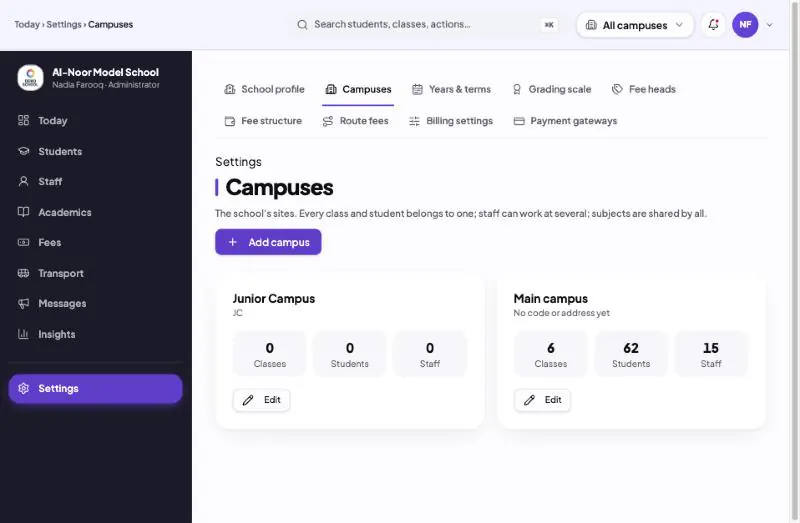
One login for all your campuses. Each campus keeps its own classes, students and staff, and the owner can see them all together.
One login, every campus
Switch campus from the top bar, or choose All campuses to see them all together.
Each campus kept apart
Every class and student belongs to one campus, so each campus's lists and reports stay its own.
Staff across campuses
Teachers and office staff can work at more than one campus with the same login.
Your data, sealed off
Every record belongs to your school, and no other school can ever see it.
Consoles for
- Principal
- Vice principal
- Accounts office
- Teacher
- Gate staff
- Transport
- Parent
- Student
Parent-teacher meetings (PTM)
Publish a meeting day, and parents book their time in the app. Teachers get their own schedule, the office sees every booking, and families get a reminder the day before.
Getting started
Live in days, not months
- 1
Book a demo
We show you EduBind with your own school in mind, on a call or at your school.
- 2
We set it up for you
Send your class list and fee structure in Excel. We import students, parents and staff and configure your fees.
- 3
Parents get the app
Parents sign in with the mobile number you already have on file. No training needed.
Questions schools ask
Before you decide
Most of our parents don't have email. Can they still use it?
Yes. Parents sign in with their mobile number and a code sent by WhatsApp or SMS. Email is optional.
Will it work in Urdu?
The parent app is fully in Urdu or English, and every message to parents has both versions. Each parent gets the one they choose.
Do we need computers or special equipment?
No. EduBind runs in the browser on any phone, tablet or computer. Gate scanning works with a phone camera.
We have more than one campus.
One account covers all your campuses, with each campus's data kept separate and an owner's view of them all.
Who enters our existing data?
We do. Send us your spreadsheets and we hand you a working school.
Can parents pay fees online?
Yes, with JazzCash, Easypaisa or a card from the parent app. Parents who pay at the bank use the printed voucher, and you match the bank statement in EduBind instead of ticking slips by hand.
Will it follow our own fee structure and grading?
Yes. You set your own fee heads, family billing, concessions and late fees, and your school's own grading scale and terms. Nothing is forced on you.
Do parents have to download an app from the Play Store?
No. Parents open the link and add EduBind to their home screen, where it works like any app, with alerts on the phone. There is nothing to update.
Do teachers have to give parents their personal phone number?
No. Parents message the class teacher or the school office inside the app. The principal can read class teacher conversations, and parents are told so.
Can parents book parent-teacher meetings?
Yes. You publish a meeting day, and parents book, change or cancel their time in the app until the cut-off you set. Teachers get their own schedule, and families get a reminder the day before.
How soon can we start?
Usually within days. Once we have your class list and fee structure, we import your students, parents and staff and set up your fees, then show your office how to run it.
Is our school's data safe?
Every record belongs to your school and is sealed off from every other school. Each person sees only what their role needs — a teacher their classes, a parent their own children.
See EduBind with your own school's fees and classes
Book a free demo. We'll show you how your vouchers, result cards and parent alerts would look — and set it all up for you.